economic_model_pipeline package
Here we add documentation concerning the overall pipeline.
The syntax is identical to that in the docstrings. For example, we can add diagrams in the same way:
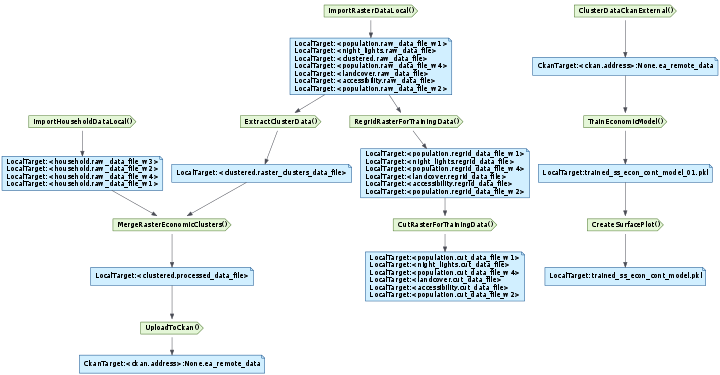
This is a caption for the diagram. Hover over nodes for more details.
For more detailed information, hover your mouse over the nodes. Those that have docstrings defined will display them as a tooltip. The diagram background tooltip lists the tasks the diagram was generated for and the date and time it was generated. We can also specify an alternative base URL for the node hyperlinks, to jump to a task’s documentation on a different page.
We can omit tasks with the omit_tasks flag:
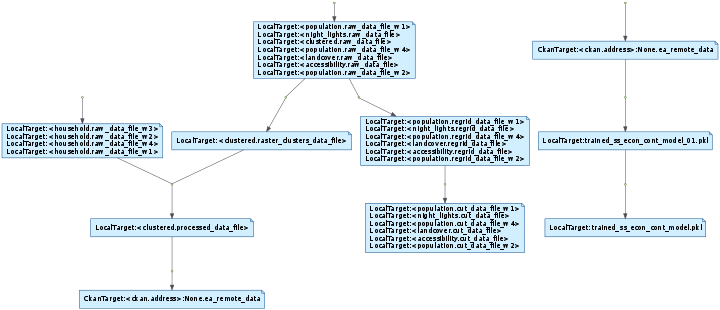
Diagram of the task and target DAG omitting tasks.
There is also an omit_outputs flag:
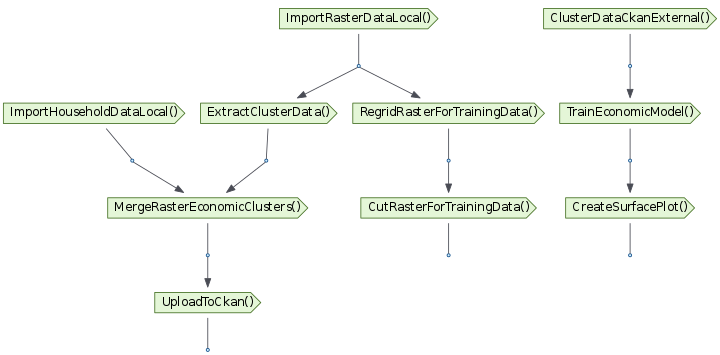
Diagram of the task and target DAG omitting output nodes.
We can filter by tag, using the tags flag - here only tasks or targets with tags another or this:
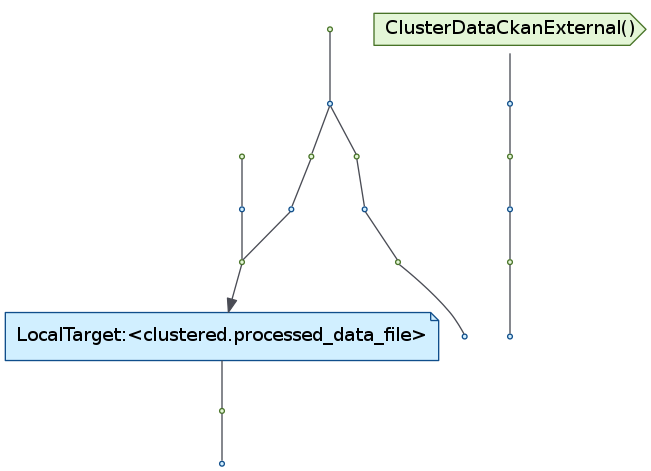
Diagram including all nodes with the tags another or this.
We can also filter by base class - here we only display subclasses of Task and CkanTarget:
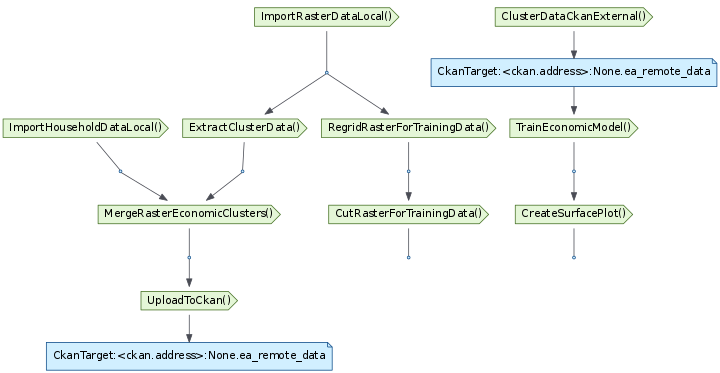
Diagram including only subclasses of pipelines.tasks.Task or CkanTarget.
We can confirm these using an inheritance diagram, for example for RegridRasterForTrainingData, ClusterDataCkanExternal and CkanTarget:

An inheritance diagram for RegridRasterForTrainingData, ClusterDataCkanExternal and CkanTarget
We can filter by tags and base classes, eg, only subclasses of Target or ExternalTask, that also have tags another or this:
A diagram combining base class and tag filters.
These also combine with the omit_~ flags, here omit_outputs (rather pointless in this case):
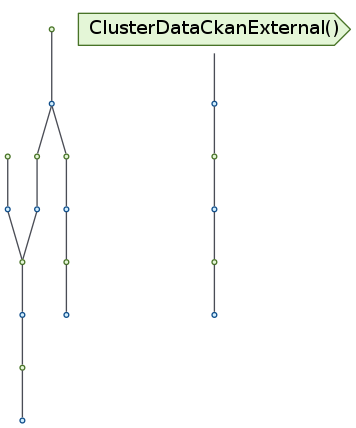
A diagram combining base class, tag and omit_outputs filters.
We can tell Sphinx to extract the documentation for every task in the module:
-
class
economic_model_pipeline.ClusterDataCkanExternal(*args, tags=None, **kwargs)¶ -
output()¶ We could use standard RST docstrings:
param temp_df: The survey response DataFrame type temp_df: DataFrame param xyz_q_list: The listof questions for xyztype xyz_q_list: list returns: A list of processed answers rtype: list Or the Google style - more readable and less fiddly to type:
Parameters: - temp_df (DataFrame) – The survey response DataFrame
- xyz_q_list (list) – The
listof questions for xyz
Returns: A
listof processed answersReturn type: list
Or the Numpy style - more readable when we’ve lots of parameters, but takes more vertical space:
Parameters: - temp_df (DataFrame) – The survey response ::class::DataFrame
- xyz_q_list (list) – The
listof questions for xyz
Returns: The
listof processed answersReturn type: list
Possible section headers:
Args(alias of Parameters)Arguments(alias of Parameters)AttributesExampleExamplesKeyword Args(alias of Keyword Arguments)Keyword ArgumentsMethodsNoteNotesOther ParametersParametersReturn(alias of Returns)ReturnsRaisesReferencesSee AlsoTodoWarningWarnings(alias of Warning)WarnsYield(alias of Yields)Yields
Pull the clustered economic data from CKAN.
This is generated from the docstring of
ClusterDataCkanExternal. It contains examples of some of the syntax made available by the Sphinx RST language. Use the examples to build the ideal docstring format for Task classes. Also see this class’soutput()docstring for the three ways we could document methods:- Standard RST
- The Google format - looks nicer
- The Numpy format - looks nicer for large numbers of parameters, but takes more vertical space
In addition to docstrings on Task classes and their methods, analysts will maintain RST files documenting the pipelines. See economic_pipeline.rst
The source of the below demonstrates some of the syntax.
It includes
codeinline, and as a block:this.py¶1 2 3 4 5
 def output(self):
     l = [1, 2, 3, ]
     i = l + [4, 5, ]
     # This should be Python highlighted and lines 2 and 3 emphasised - these don't seem to work. Hey ho.
     return [LocalTarget(os.path.join(config.get("paths", "quarterly_data_path"), "Section_6__Household.csv"))]
It includes a doctest section. These can be automatically tested on each commit to test the documentation is up to date.
>>> 1 + 1
2
Some tables:
Header row, column 1 (header rows optional) Header 2 Header 3 Header 4 body row 1, column 1 column 2 column 3 column 4 body row 2 … … Simpler:
A B A and B False False False True False False False True False True True True A link
A footnote too.
Also, a footnoted academic reference [ref01]
Some text replacement replacement replaced
An internal reference to our in-page
RegridRasterForTrainingDatawill convert into a hyperlink.An external reference to Luigi
Taskwill not convert into a hyperlink. You can use:class:,:mod:and:func:similarly.Warning
It also includes a warning.
A version comment is added when a package has functionality added:
New in version 0.30.
An image:

Inline maths:
 .
.Maths sections, labelled for cross-referencing:
(1)

Euler’s identity, equation (1).
Nb. When a
:label:is specified readthedocs currently renders oddly on the autodoc list, so don’t label equations until readthedocs fixes this.There are more complex directives documented here.
This is what the pipeline DAG diagram produces for
CutRasterForTrainingData. The pipeline diagram directive can merge multiple endpoint task DAGs into a single diagram - in this caseCutRasterForTrainingData,CreateSurfacePlotandUploadToCkan.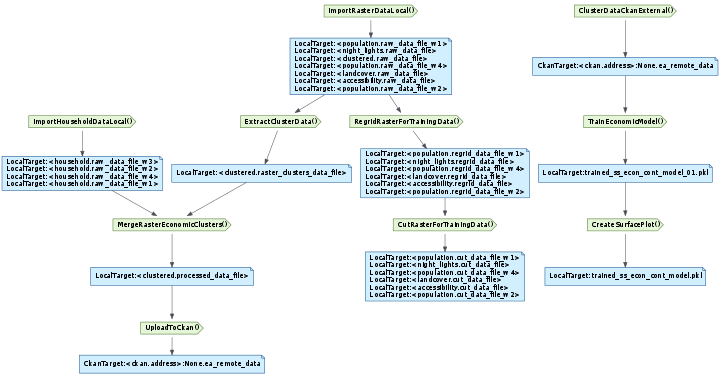
There is an inheritance diagram directive, here run on
RegridRasterForTrainingData:
[ref01] https://www.example.com
-
-
class
economic_model_pipeline.CreateSurfacePlot(*args, tags=None, **kwargs)¶ -
output()¶ The output that this Task produces.
The output of the Task determines if the Task needs to be run–the task is considered finished iff the outputs all exist. Subclasses should override this method to return a single
Targetor a list ofTargetinstances.- Implementation note
- If running multiple workers, the output must be a resource that is accessible by all workers, such as a DFS or database. Otherwise, workers might compute the same output since they don’t see the work done by other workers.
See Task.output
-
requires()¶ The Tasks that this Task depends on.
A Task will only run if all of the Tasks that it requires are completed. If your Task does not require any other Tasks, then you don’t need to override this method. Otherwise, a Subclasses can override this method to return a single Task, a list of Task instances, or a dict whose values are Task instances.
See Task.requires
-
run()¶ The task run method, to be overridden in a subclass.
See Task.run
-
-
class
economic_model_pipeline.CutRasterForTrainingData(*args, tags=None, **kwargs)¶ Cut Raster for Training Data.
-
output()¶ The output that this Task produces.
The output of the Task determines if the Task needs to be run–the task is considered finished iff the outputs all exist. Subclasses should override this method to return a single
Targetor a list ofTargetinstances.- Implementation note
- If running multiple workers, the output must be a resource that is accessible by all workers, such as a DFS or database. Otherwise, workers might compute the same output since they don’t see the work done by other workers.
See Task.output
-
requires()¶ The Tasks that this Task depends on.
A Task will only run if all of the Tasks that it requires are completed. If your Task does not require any other Tasks, then you don’t need to override this method. Otherwise, a Subclasses can override this method to return a single Task, a list of Task instances, or a dict whose values are Task instances.
See Task.requires
-
run()¶ The task run method, to be overridden in a subclass.
See Task.run
-
-
class
economic_model_pipeline.ExtractClusterData(*args, tags=None, **kwargs)¶ - Description:
- Take GPS Coordinates for clusters and extract the median value of the desired rasters for each cluster.
- Inputs:
- Raster Filepaths (Dictionary of CkanTargets): raster files of independent variables DataFrame Filepath (Dictionary of LocalTarget): dataframe file of GPS points for cluster centers.
- Outputs:
- raster_clusters_data_file (Serialized DataFrame): dataframe with independent variables for each cluster.
- User Defined Parameters:
- data_list (List): list of variables from the input dataframe to be used as independent variables in the model. Default = [‘accessibility’, ‘population’, ‘night_lights’, ‘landcover’] multi_wave_data (List): list of variables in data_list that vary round to round. Default = [‘population’] waves (Dict): a dictionary translating the integer number wave to the string year. Default = {1: ‘2015’, 2: ‘2016’, 3: ‘2016’, 4: ‘2017’}
Literary References: .. method:: buffer_points() from the `geospatialtasks repo <https
//github.com/kimetrica/geospatialtasks/blob/input_functions/functions/geospatial.py>`_-
calc_cluster_data() from the `geospatialtasks repo <https //github.com/kimetrica/geospatialtasks/blob/input_functions/functions/remote_sensing_functs.py>`
-
merge_dataframes(stats_df, df, data_col_name_map, on_wave=False)¶ Concatenate multiple rounds of data. stats_dfs = list of dataframes to concatenate df = dataframe with the one row per cluster that will acrew all the data data_col_name_map = map of old to new data column nape e.g {‘median’: ‘population’}
-
output()¶ The output that this Task produces.
The output of the Task determines if the Task needs to be run–the task is considered finished iff the outputs all exist. Subclasses should override this method to return a single
Targetor a list ofTargetinstances.- Implementation note
- If running multiple workers, the output must be a resource that is accessible by all workers, such as a DFS or database. Otherwise, workers might compute the same output since they don’t see the work done by other workers.
See Task.output
-
requires()¶ The Tasks that this Task depends on.
A Task will only run if all of the Tasks that it requires are completed. If your Task does not require any other Tasks, then you don’t need to override this method. Otherwise, a Subclasses can override this method to return a single Task, a list of Task instances, or a dict whose values are Task instances.
See Task.requires
-
run()¶ The task run method, to be overridden in a subclass.
See Task.run
-
class
economic_model_pipeline.ImportHouseholdDataLocal(*args, tags=None, **kwargs)¶ - Description:
- Pull the 4 waves of household survey data from CKAN.
- Inputs:
- HFS data (DataFrame): High Frequency Survey data from 2015-2017 from the World Bank
- Outputs:
- DataFrame Filepaths (Dictionary of CkanTargets): filepaths of household survey data pulled from CKAN server.
User Defined Parameters: Literary References: Methods:
-
output()¶ The output that this Task produces.
The output of the Task determines if the Task needs to be run–the task is considered finished iff the outputs all exist. Subclasses should override this method to return a single
Targetor a list ofTargetinstances.- Implementation note
- If running multiple workers, the output must be a resource that is accessible by all workers, such as a DFS or database. Otherwise, workers might compute the same output since they don’t see the work done by other workers.
See Task.output
-
class
economic_model_pipeline.ImportRasterDataLocal(*args, tags=None, **kwargs)¶ - Description:
- Pull the raster data for independent variables.
- Inputs:
- accessibility (Raster): the accessibility data from the Malaria Atlas Project night_lights (Raster): the night lights data from NOAA landcover (Raster): the landcover data from USGS population_2015 (Raster): the population data from the population model population_2016 (Raster): the population data from the population model population_2017 (Raster): the population data from the population model
- Outputs:
- Raster Filepaths (Dictionary of CkanTargets): local filepaths to all data pulled in from CKAN server.
User Defined Parameters: References: Methods:
-
output()¶ The output that this Task produces.
The output of the Task determines if the Task needs to be run–the task is considered finished iff the outputs all exist. Subclasses should override this method to return a single
Targetor a list ofTargetinstances.- Implementation note
- If running multiple workers, the output must be a resource that is accessible by all workers, such as a DFS or database. Otherwise, workers might compute the same output since they don’t see the work done by other workers.
See Task.output
-
class
economic_model_pipeline.MergeRasterEconomicClusters(*args, tags=None, **kwargs)¶ - Description:
- Merge the raster data with the socioeconomic data for each cluster.
- Inputs:
- raster_clusters_data_file (Serialized DataFrame): dataframe with independent variables for each cluster. DataFrame Filepaths (Dictionary of CkanTargets): filepahts to household survey data containing dependent variable.
- Outputs:
- processed_data_file (csv): dataframe with independent and dependent variables for each cluster.
- User Defined Parameters:
- filename: the filepath at which to save the results. dep_var: the name of the dependent variable contained in the household survey data. Default = tc_imp poverty_line: the poverty line of this dataset. Default = 8.7126
Literary References Methods:
-
output()¶ The output that this Task produces.
The output of the Task determines if the Task needs to be run–the task is considered finished iff the outputs all exist. Subclasses should override this method to return a single
Targetor a list ofTargetinstances.- Implementation note
- If running multiple workers, the output must be a resource that is accessible by all workers, such as a DFS or database. Otherwise, workers might compute the same output since they don’t see the work done by other workers.
See Task.output
-
requires()¶ The Tasks that this Task depends on.
A Task will only run if all of the Tasks that it requires are completed. If your Task does not require any other Tasks, then you don’t need to override this method. Otherwise, a Subclasses can override this method to return a single Task, a list of Task instances, or a dict whose values are Task instances.
See Task.requires
-
run()¶ The task run method, to be overridden in a subclass.
See Task.run
-
class
economic_model_pipeline.RegridRasterForTrainingData(*args, tags=None, **kwargs)¶ Regrid Raster for Training Data.
-
output()¶ The output that this Task produces.
The output of the Task determines if the Task needs to be run–the task is considered finished iff the outputs all exist. Subclasses should override this method to return a single
Targetor a list ofTargetinstances.- Implementation note
- If running multiple workers, the output must be a resource that is accessible by all workers, such as a DFS or database. Otherwise, workers might compute the same output since they don’t see the work done by other workers.
See Task.output
-
requires()¶ The Tasks that this Task depends on.
A Task will only run if all of the Tasks that it requires are completed. If your Task does not require any other Tasks, then you don’t need to override this method. Otherwise, a Subclasses can override this method to return a single Task, a list of Task instances, or a dict whose values are Task instances.
See Task.requires
-
run()¶ The task run method, to be overridden in a subclass.
See Task.run
-
-
class
economic_model_pipeline.TrainEconomicModel(*args, tags=None, **kwargs)¶ Run the economic model using the cluster data Dependencies: EconomicModel, model_ert_cont
-
output()¶ The output that this Task produces.
The output of the Task determines if the Task needs to be run–the task is considered finished iff the outputs all exist. Subclasses should override this method to return a single
Targetor a list ofTargetinstances.- Implementation note
- If running multiple workers, the output must be a resource that is accessible by all workers, such as a DFS or database. Otherwise, workers might compute the same output since they don’t see the work done by other workers.
See Task.output
-
requires()¶ The Tasks that this Task depends on.
A Task will only run if all of the Tasks that it requires are completed. If your Task does not require any other Tasks, then you don’t need to override this method. Otherwise, a Subclasses can override this method to return a single Task, a list of Task instances, or a dict whose values are Task instances.
See Task.requires
-
run()¶ The task run method, to be overridden in a subclass.
See Task.run
-
-
class
economic_model_pipeline.UploadToCkan(*args, tags=None, **kwargs)¶ - Description:
- Upload dataframe containing all independent and dependent variables for the clusters to CKAN
- Inputs:
- processed_data_file (csv): dataframe with independent and dependent variables for each cluster.
- Outputs:
- ea_remote_data (csv): DataFrame of all data uploaded to CKAN
User Defined Parameters: Literary References: Methods:
-
output()¶ The output that this Task produces.
The output of the Task determines if the Task needs to be run–the task is considered finished iff the outputs all exist. Subclasses should override this method to return a single
Targetor a list ofTargetinstances.- Implementation note
- If running multiple workers, the output must be a resource that is accessible by all workers, such as a DFS or database. Otherwise, workers might compute the same output since they don’t see the work done by other workers.
See Task.output
-
requires()¶ The Tasks that this Task depends on.
A Task will only run if all of the Tasks that it requires are completed. If your Task does not require any other Tasks, then you don’t need to override this method. Otherwise, a Subclasses can override this method to return a single Task, a list of Task instances, or a dict whose values are Task instances.
See Task.requires
-
run()¶ The task run method, to be overridden in a subclass.
See Task.run